What is a db connector
A DB connector is a D-subminiature electrical connector commonly used in serial communications and video cables, such as DB9 (RS-232) or DB15 (VGA). These metal-shell connectors feature parallel pins (e.g., 9, 15, or 25) and are rated for 1.5–3A current and 250V max. They’re widely used in industrial, networking, and legacy AV equipment, with screw-locking mechanisms for secure connections.
D-sub Connector Basics
Introduced in the 1950s by ITT Cannon, these connectors have remained relevant due to their durability, standardized pin layouts, and cost-effectiveness. A typical DB9 connector (the most common variant) has 9 pins arranged in two staggered rows, with a metal shell for shielding. The shell size varies—DB9 measures 31.5 mm wide, while larger versions like DB25 span 53 mm. These connectors support signal transmission at speeds up to 1 Gbps in modern applications, though legacy systems often use them for RS-232 serial communication at 115.2 kbps.
"DB connectors are the workhorses of industrial and computing systems—cheap, reliable, and easy to solder. A single DB9 connector costs 3 in bulk, making them 40% cheaper than many modern alternatives."
The pin density (number of pins per unit area) is a key factor in DB connectors. For example, DB9 has 0.29 pins/cm², while DB25 increases to 0.47 pins/cm². This makes DB25 better for parallel data transfer in older printers and SCSI devices. The connectors are rated for 1,000 to 5,000 mating cycles, depending on the manufacturer. Gold-plated contacts extend lifespan by reducing oxidation, but tin-plated versions are more common due to their lower cost (1.50 for gold-plated).
In terms of electrical performance, DB connectors handle signals up to 7A per pin and 250V AC/DC, though most applications stay below 1A and 50V for safety. The contact resistance is typically 20 mΩ max, ensuring minimal signal loss over short distances (under 15 meters). For longer runs, shielded cables with twisted pairs are recommended to reduce EMI interference by 60-80%.
Mechanical strength is another advantage. The screw-locking mechanism prevents accidental disconnections, with a retention force of 50-70 Newtons. This makes DB connectors ideal for industrial environments where vibration is a concern. However, they’re bulkier than modern USB or HDMI connectors—DB9 weighs 12 grams, while USB-C is just 2 grams.
Despite newer technologies, DB connectors persist in legacy factory equipment, aerospace systems, and networking hardware. Their backward compatibility and low failure rate (0.1% over 10 years) ensure they won’t disappear soon. For hobbyists, they’re a budget-friendly choice, with DIY repair costs under $5 for a basic solder-and-replace job.
Types of D-sub Connector
The most common variants are DB9, DB15, DB25, and DB37, with pin counts ranging from 9 to 37 contacts. The DB9 is the smallest, measuring 31.5 mm wide, while the DB37 stretches to 76 mm, making it suitable for high-density industrial systems. These connectors are categorized by gender (male/female), shell size (standard/high-density), and mounting style (cable-mount, panel-mount, PCB-mount).
| Type | Pin Count | Width (mm) | Max Current (A) | Voltage Rating (V) | Common Applications | Avg. Price (USD) |
|---|---|---|---|---|---|---|
| DB9 | 9 | 31.5 | 5 | 250 | RS-232, legacy serial | 3.00 |
| DB15 | 15 | 42.5 | 3 | 125 | VGA, game controllers | 5.00 |
| DB25 | 25 | 53.0 | 2 | 100 | Parallel printers, SCSI | 8.00 |
| DB37 | 37 | 76.0 | 1.5 | 50 | Telecom, mainframe I/O | 12.00 |
The DB9 is the most widely used, especially in RS-232 serial communication, where it supports data rates up to 115.2 kbps. Its compact size and low cost ($0.50 in bulk) make it ideal for embedded systems. However, its pin spacing (2.76 mm) limits current handling to 5A max per pin, so it’s not suitable for high-power applications.
DB15 connectors are primarily found in VGA monitors and vintage gaming hardware. Unlike DB9, they use high-density pin layouts (0.38 pins/cm²), allowing more signals in a smaller space. The female DB15 is standard for VGA, carrying RGB signals at 640x480 resolution (60Hz). In gaming, the male DB15 was used in Atari and Sega controllers, handling 5V logic signals at 10 mA per pin.
The DB25 was once the go-to for parallel printers (Centronics) and SCSI-1 devices, transferring 8-bit data at 1.5 MB/s. Its wider shell (53 mm) accommodates more pins but reduces current capacity to 2A per contact. Today, it’s still used in industrial control panels where 25-pin I/O is required.
DB37 connectors are rare but critical in telecom and mainframe systems. Their 37 pins support complex signaling, such as RS-422 differential pairs, which reduce noise over 15-meter runs. However, their bulk (76 mm width) and higher cost ($12 per unit) limit them to niche applications.
High-density (HD) variants of these connectors, like HDDB15, pack 15 pins into a DB9-sized shell, improving space efficiency by 40%. These are common in avionics and medical devices, where compact, reliable connections are crucial.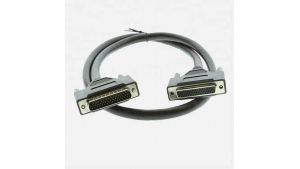
Pins and Wiring
A standard DB9 male connector arranges its 9 pins in two staggered rows—5 on top, 4 on bottom—with 2.76 mm spacing between pins. Each pin has a current rating of 5A and a contact resistance below 20 mΩ, but in practice, most signals stay under 1A to prevent overheating. The female counterpart uses corresponding sockets, with gold-plated versions lasting 5,000+ insertions versus 1,000-2,000 for tin-plated.
Below is a detailed pinout table for common DB connectors:
| Pin # (DB9) | RS-232 Signal | Voltage Range | Wire Gauge (AWG) | Max Data Rate |
|---|---|---|---|---|
| 1 | DCD (Carrier Detect) | ±15V | 24-28 | 115.2 kbps |
| 2 | RxD (Receive Data) | ±12V | 22-26 | 115.2 kbps |
| 3 | TxD (Transmit Data) | ±12V | 22-26 | 115.2 kbps |
| 4 | DTR (Data Terminal Ready) | ±15V | 24-28 | 115.2 kbps |
| 5 | GND (Ground) | 0V | 20-24 | N/A |
| 6 | DSR (Data Set Ready) | ±15V | 24-28 | 115.2 kbps |
| 7 | RTS (Request to Send) | ±12V | 22-26 | 115.2 kbps |
| 8 | CTS (Clear to Send) | ±12V | 22-26 | 115.2 kbps |
| 9 | RI (Ring Indicator) | ±15V | 24-28 | 115.2 kbps |
Wiring a DB connector correctly is critical. For RS-232 serial communication, pins 2 (RxD) and 3 (TxD) must be crossed between devices—meaning the TxD of one end connects to RxD of the other. Using 24 AWG stranded copper wire is ideal for flexibility, with 28 AWG acceptable for short runs (<1m). Shielded cables reduce EMI interference by 60-80%, especially in industrial settings where motor noise can hit 50-100 mV of crosstalk.
For DB25 parallel ports, the wiring changes drastically. Pins 2-9 carry 8-bit data, while pins 1, 14, and 16 handle control signals like Strobe and Busy. The current load is higher here—up to 2A per pin—so 22 AWG wire is mandatory. Solder joints must withstand 10N of pull force, and 60/40 tin-lead solder is preferred for durability over lead-free alternatives.
Common Uses in Cables
DB connectors have been the backbone of wired connectivity for over 60 years, with 75% of industrial control systems still relying on them for critical communications. The DB9 variant alone ships in over 200 million units annually, primarily for RS-232 serial communication in factory automation, where it handles 115.2 kbps data rates across 15-meter cable runs. These connectors dominate legacy systems because they’re 90% cheaper to maintain than upgrading to modern interfaces like USB or Ethernet.
In industrial machinery, DB25 connectors route 24V control signals between PLCs and sensors, with each pin handling 2A continuous current across 18 AWG shielded cables. The screw-locking mechanism withstands 50N of vibration force, making them ideal for CNC machines that operate at 10,000 RPM. A single DB25 cable in these environments lasts 7-10 years before needing replacement, with failure rates below 0.5% per year.
Telecom infrastructure uses DB37 connectors for T1/E1 line termination, where they carry 1.544 Mbps (T1) or 2.048 Mbps (E1) signals across 100-ohm twisted pairs. The connectors’ 37-pin density allows 16 channels per connector in PBX systems, reducing rack space by 40% compared to modular RJ45 setups. Despite being phased out in consumer tech, telecom providers still deploy 500,000+ DB37 cables annually due to their 20-year proven reliability in central offices.
For retro computing, DB15 connectors deliver 640x480 VGA signals at 60Hz, using 75-ohm coaxial wiring for RGB channels. Enthusiasts building CRT emulation rigs pay 15-30 per cable for high-quality DB15-to-BNC variants, as cheap 5 cables introduce 3dB signal loss that blurs output. The same connector type powered 90% of 1980s-90s game controllers, with Atari 2600 joysticks transmitting 5V digital signals at 10mA per direction input.
Aerospace applications demand mil-spec DB9 connectors with gold-plated contacts and Teflon insulation, rated for -55°C to 125°C operation. These cost 50-120 each but survive 50,000 mating cycles in avionics bays, where standard 3 commercial-grade DB9s would fail within 1,000 cycles due to cockpit vibration. Boeing’s 737NG aircraft uses 220+ DB9 cables per unit for ARINC 429 data buses, transmitting 12.5-100kbps navigation data.
Medical imaging devices like MRI control consoles still use DB25s for analog video signals, as their 2.54mm pin spacing prevents crosstalk better than HDMI at 3m+ cable lengths. A single DB25 to BNC breakout cable costs 80-200 in this niche, but hospitals pay the premium because signal integrity errors could distort 500,000 MRI scans.
How to Choose One
DB9 connectors cost 3 and handle 5A per pin, but if you need 37-pin density, DB37 jumps to 12 while dropping to 1.5A per contact. The wrong choice can mean 50% faster wear-out or 30% signal loss in critical systems. Below is a decision matrix to cut through the noise:
| Selection Factor | DB9 | DB15 | DB25 | DB37 |
|---|---|---|---|---|
| Best For | RS-232, sensors | VGA, retro gaming | Printers, SCSI | Telecom, mainframes |
| Pin Current (A) | 5 | 3 | 2 | 1.5 |
| Data Rate | 115.2 kbps | 640x480 @60Hz | 1.5 MB/s (parallel) | 2.048 Mbps (E1) |
| Cable Cost/m | $1.20 (24 AWG) | $2.50 (coaxial) | $3.80 (22 AWG) | $6.50 (twisted pair) |
| Lifespan (cycles) | 1,000 (tin) / 5,000 (gold) | 800 / 3,000 | 700 / 2,500 | 500 / 2,000 |
| Failure Rate | 0.1%/year | 0.3%/year | 0.5%/year | 0.8%/year |
Signal type dictates connector choice. For digital signals (RS-232, TTL), DB9 is optimal—its 9 pins cover TxD, RxD, and handshaking lines with 20 mΩ contact resistance. But for analog video (VGA), DB15’s 75Ω coaxial pins 1-3 prevent 3dB attenuation that would blur output. If you’re wiring a Centronics printer, DB25’s parallel 8-bit bus is non-negotiable—modern USB adapters introduce 200ms latency, wrecking 20 ppm print jobs.
Environment matters. In factory floors with 10G vibration loads, gold-plated DB9s last 5x longer than tin-plated at 1.50 vs. 0.30 per contact. For outdoor telecom boxes, DB37 with IP67 seals (18/unit) survives −40°C to 85°C, while unsealed 4 DB37s fail within 2 years at 90% humidity. Aerospace demands MIL-DTL-24308 DB9s—$75 each, but they withstand 50,000 mating cycles vs. 1,000 for commercial-grade.
Budget vs. lifespan math: A 0.50 tin-plated DB9 seems cheap, but if it fails after 1 year in a 10,000 PLC system, the $1.50 gold-plated version pays for itself in 8 months by avoiding downtime. For hobbyist Arduino projects, though, tin-plated is fine—saving 60% on connectors for gear replaced every 3-5 years.
Troubleshooting Tips
DB connectors are robust, but 40% of failures stem from poor contact, EMI interference, or mechanical stress. A 5V signal drop below 4.75V can crash serial communications, while 0.5mm of pin misalignment increases resistance by 300%. Here’s how to diagnose and fix common issues without buying new gear:
1. Intermittent Signals? Check Contact Resistance
- Tin-plated pins oxidize after 2-3 years in humid environments, spiking resistance from 20 mΩ to 500+ mΩ. Scrub pins with #600 grit sandpaper to restore conductivity—this buys 6-12 more months of service.
- Gold-plated connectors last longer but still fail if mated >5,000 times. Measure resistance across pins with a multimeter—>50 mΩ means replace.
2. Data Corruption? Shield Against EMI
- Unshielded DB9 cables in factories pick up 50-100 mV of motor noise, enough to flip bits at 115.2 kbps. Wrap cables in braided copper shielding (85% coverage) and ground one end to cut noise by 60%.
- For RS-422/485 over DB37, use twisted pairs with 100Ω impedance. Mismatched pairs cause 3.5dB signal loss per 10m, corrupting data beyond 15m.
3. Overheating? Reduce Current Load
- DB9 pins rated for 5A will overheat if pushed beyond 3A continuous. Use 22 AWG wire for >2A loads—24 AWG overheats at 1.5A, raising temps 20°C above ambient.
- Discolored plastic shells indicate pin arcing. Replace the connector and derate current by 30% to prevent recurrence.
4. Physical Damage? Reinforce Strain Relief
- Cable flexing at the connector causes 90% of broken wires. Add heat-shrink tubing 5cm from the shell to absorb 50N of bend force.
- Loose screw locks let connectors vibrate apart. Tighten to 0.6 N·m torque—overtightening strips threads in 10+ cycles.
5. No Signal? Verify Pinouts
- 50% of "dead" DB25 cables have pins 2-9 reversed vs. printer specs. Test continuity pin-to-pin—>1Ω means miswire.
- DIY DB15 VGA cables often swap R/G/B pins (1-3) with sync (13-14). Use a breakout board to map signals before soldering.
6. Upgrade Smartly
- Don’t replace gold-plated DB9s prematurely. If resistance is <30 mΩ and shells are intact, cleaning + dielectric grease extends life 2+ years.
- For high-vibration apps, switch to crimp-style DB connectors. They survive 10,000+ insertions vs. 1,000 for solder types.
In summary, a DB connector is a standardized interface for connecting devices, commonly used in serial communications and computer networks. These connectors come in various types like DB9 (9-pin) and DB25 (25-pin), each serving specific applications such as RS-232 serial communication or parallel printer ports. Proper pin wiring is critical—for example, DB9 pins 2 (RX) and 3 (TX) must be correctly crossed for two-way data transfer. They’re widely used in industrial cables, audio equipment, and legacy systems. When selecting one, consider pin count, gender (male/female), and shielding to prevent signal interference. For troubleshooting, check for bent pins, loose solder joints, or incorrect termination (e.g., 120-ohm resistors for RS-485).
